AI-powered side project generator for vibe coders.
Find an app idea.
Make a plan to build it.
4 side project ideas from what's trending on GitHub, Product Hunt and Hacker News and 4 more sources. Save one and get a build plan plus a prompt for your AI coding tool.
4 free generations a month · 4 ideas each
Intuitive form. Intuitive results.
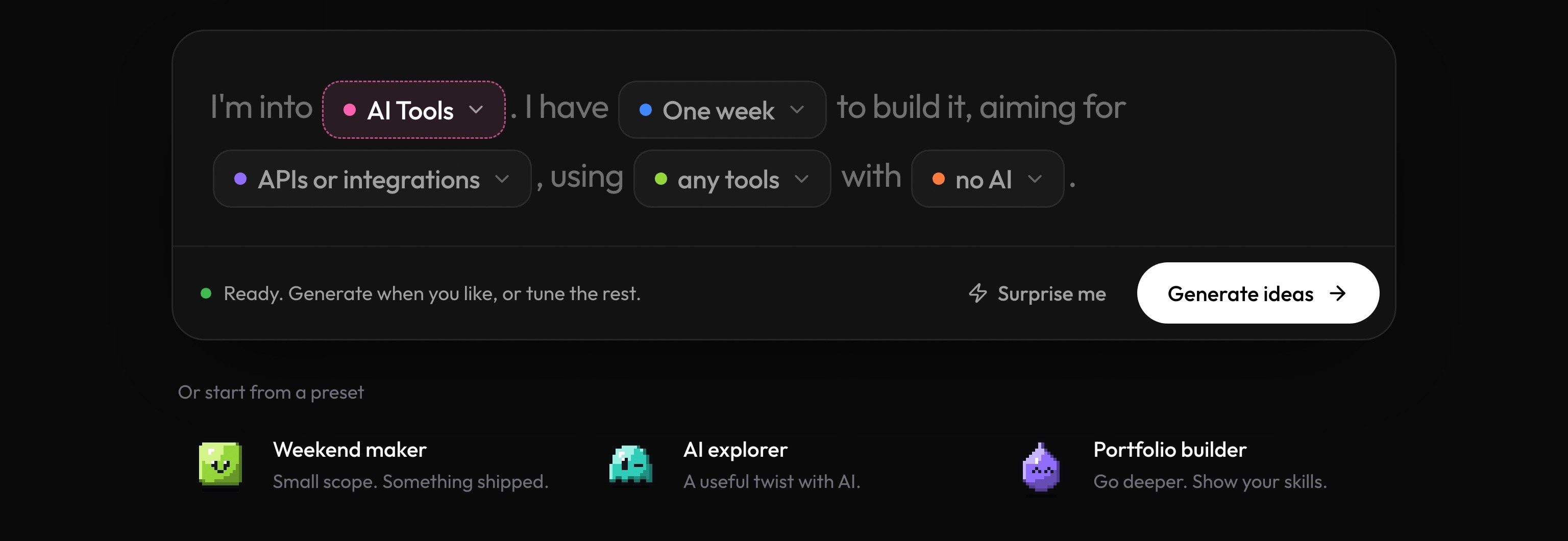
One sentence, five blanks. What you are into, how much time you have, what you are aiming for, your tools, and whether to use AI. Tap a pill to change it, start from a preset, or hit Surprise me.
11 categories · 101 ideas
An idea for every interest.
Pick what you are into and see ideas the way the generator writes them: a pitch, a build time, a stack, and a plan. Your own round is shaped by your time and tools.
View all ideasWeights RouletteA guessing game where a tiny model fakes famous answers
Players see an answer written by a small local model and guess whether it is a real quote, a real fact, or something the model made up. Each round shows how often small models sound confident while being wrong.
Parquet PeekA drag-and-drop explorer for big CSV and Parquet files
Drop a large file and get column profiles, null counts, top values and a few suggested charts, all computed locally. It saves the slow step of opening huge files in a spreadsheet that crashes.
Stand Up NudgeA break reminder that learns when you are in flow
A small desktop app that watches for natural pauses in typing and suggests a short stretch or walk only then, instead of interrupting mid-thought. It logs which breaks you took so you can see patterns over a week.
Launch Page ReaderA checker that critiques your launch page like a first-time visitor
Paste your tagline, description and first comment, and it plays a visitor who has ten seconds, then reports what they understood, what confused them and which line they would cut. It helps makers fix unclear copy before launch day.
Build Pack
Questions first. Then a plan your AI can follow.
The best prompt starts with the right questions. Build Pack asks about your project, then writes the spec and the step-by-step plan your AI coding tool needs to get it right. 3 free a month, 20 on Pro.
- Step 01Answer a few questions
It asks what matters.Five quick questions, not a form
Who signs in, what makes the first version, where the data lives. Each question shows the exact features it means, with answers you can tap.
See the plans - Step 02Get the plan
It writes the plan.The spec your AI needs
Scope, architecture, database schema, screens, edge cases, acceptance criteria and a launch checklist, plus a step-by-step build plan for your stack.
See a finished build pack - Step 03Hand it to your AI
Your AI tool reads it.One prompt, written for your tool
It all goes into one prompt. Pick where you are building, like Lovable, Bolt, Cursor or Claude Code, and it copies a version written for that tool.
Trending vibe coding ideas
The top four from our latest public ideas, ranked by how hard their signals are trending. 101 ideas in the library, each with a pitch, features, build plan, and the prompt you would export.
How it works
Less wondering. More building.
Three steps, all in the browser. Make an account, find an idea worth vibe coding, then take its prompt to your editor and start building.
- Step 01Create an account
Make a free account.Google or email, then your dashboard
Sign up with Google or your email and you land on your dashboard. Your first 4 generations each month are free.
Sign up free - Step 02Find an idea
Generate ideas.4 ideas shaped around you
Tap Generate ideas, pick your interests, the time you have and your tools, and get 4 ideas shaped around you, each with why it's trending right now.
See the generator - Step 03Start building
Save one. Copy the prompt.A project with a build pack
Save the idea worth building. It becomes a project with a build pack and one prompt you paste into Claude, Cursor, or any AI editor.
See your projects
Grounded in what's trending
7 live sources, 200+ fresh signals every morning. Every idea says why it's trending now, from GitHub stars to Product Hunt launches.
FAQ
Frequently asked questions
Answers on where the ideas come from, what a build plan includes, pricing from $9 a month, and builder profiles.